To add a transition on iPhone, tap the marker between two clips and choose one. The harder question is which and how long: use a cross dissolve for a change of time or place, a hard cut for everything else, and keep the length between 0.3 and 0.5 seconds for short-form. A transition overlaps its two clips, so a one-second dissolve eats half a second off each side, which is how transitions swallow the first word of a sentence. Most cuts in a good edit have no transition at all.
The mechanics take one tap. In iMovie you tap the small bowtie between two clips; in most other iPhone editors you tap a marker on the cut itself and pick from a list. What no tutorial tells you is which transition to use, how long to make it, and when to use none at all - and those are the decisions that separate an edit that looks intentional from one that looks like a slideshow.
The mechanics, briefly
- iMovie: tap the bowtie icon between two clips, pick Dissolve, Slide, Wipe or Fade, and set a duration of 0.5s, 1.0s, 1.5s or 2.0s. Apple documents the control in Adjust transitions in iMovie on iPhone.
- Most third-party editors: tap the transition marker on the cut, choose from a grid, and drag a duration slider.
- The Photos app cannot do this at all. It edits one clip; it has no concept of a cut between two.
That is genuinely all there is to the how. The rest of this is the part that matters.
A transition is an overlap, not a decoration
This is the mechanical fact that explains most transition problems: a transition overlaps the two clips. A one-second dissolve pulls the second clip one second earlier, and both clips are half-visible through the middle of it.
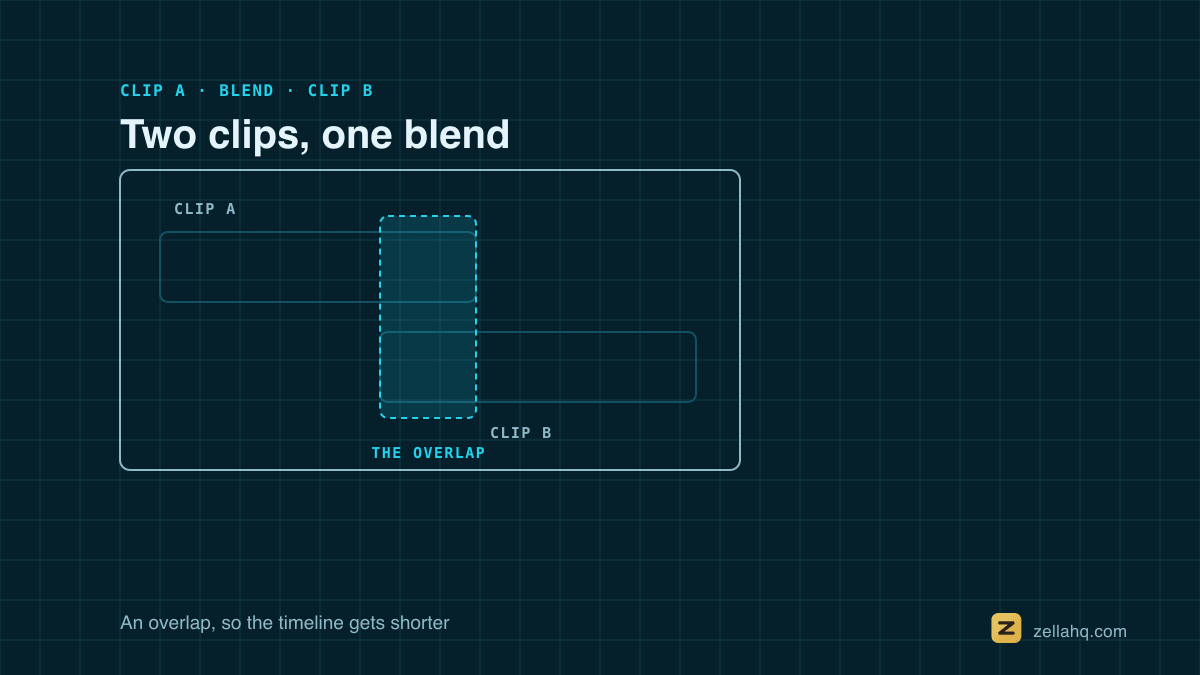
Two consequences follow, and they cause almost every complaint:
- Your timeline gets shorter. Ten one-second transitions remove roughly ten seconds of video. If you cut to music, everything after the first transition drifts.
- It eats words. If the second clip starts with someone speaking immediately, the first half-second of that sentence plays under a fade. The fix is not a shorter transition; it is to leave a beat of silence at the head of the clip before you add one.
Which transition, and when
The honest answer is that most cuts should have no transition. Watch anything that holds attention and count them: a talking-head video that cuts every four seconds usually has zero. A hard cut is invisible, and invisible is what you want when the content is carrying the video.
When you do use one, there is a small vocabulary that reads as deliberate:
- Cross dissolve means time passed or place changed. It is the only transition with a settled meaning in film grammar, which is why it never looks amateurish.
- Fade to black means this section is over. Use it once, at the end, or between genuinely separate chapters.
- Whip pan covers a change of energy or location in an action-led edit. It works because it imitates a camera move, which means it needs motion in at least one of the two clips to make sense.
- Zoom or punch works on a beat. If your music has one there, it lands; if not, it reads as a stunt.
- Everything else - spins, glitches, page curls, star wipes - is a style choice that dates fast, and reads as a style choice rather than as editing.
The rule that keeps this simple: if you cannot say what the transition means, use a cut.
How long
For short-form video, 0.3 to 0.5 seconds is the working range, and it is shorter than most default settings.
- 0.3s is barely felt, which is usually what you want.
- 0.5s reads as a soft, deliberate change.
- 1.0s and up belongs to long-form, montages and endings. In a 30-second video it is an enormous amount of screen time.
If your editor defaults to one second, change it. That default comes from an era of longer videos.
Jump cuts inside one take
Cutting out your own pauses leaves jump cuts - the background stays put while you visibly teleport. There are three legitimate answers:
- Leave them. The jump cut is the native grammar of talking-head video now. Viewers read it as pace, not as a mistake.
- Cover the cut with a whip pan or a punch-in. This is what most short-form editors are doing when they use motion transitions. It works because it gives the eye a reason for the discontinuity.
- Punch in slightly on alternating clips. No transition at all; the change of framing hides the jump. This costs you a little resolution and nothing else.
What does not work is a cross dissolve on a jump cut. Dissolving between two nearly identical frames of the same person produces a ghost, and it reads as a mistake rather than as a choice.
What an automatic pass should and should not do
Most editors now offer to place transitions for you. A good pass:
- Varies them. Ten identical whip pans is the strongest possible signal that nobody chose them.
- Spaces them out. Transitions every couple of seconds compete with your content.
- Keeps them short. See above.
If your editor's automatic pass places nothing on a single unbroken recording, that is worth understanding: some tools deliberately skip cuts inside one continuous take, because those are jump cuts and a dissolve there is the wrong answer. That reasoning is right for an automatic taste pass and wrong for a button you pressed on purpose - if you asked for transitions, you should get them.
In Zella
Transitions sit on the timeline as markers on the cut they belong to. Tap one to select it, drag it onto a different cut, or press and hold to delete it. Auto-Transitions cuts a continuous recording at its natural pauses first, then places varied transitions across those cuts, and Auto-Polish uses a gentler grammar because it is deciding on your behalf rather than doing what you asked.
The catalogue runs to 24 types, and the ones worth learning first are the four with meanings: cross dissolve, fade, whip pan and a punch. See the iOS editor guide for placing and retiming them, and cut cadence for how often to cut in the first place, which matters more than what you put on the cuts.
Frequently asked questions
Why does my video get shorter when I add transitions? Because a transition overlaps its two clips. A one-second dissolve pulls the second clip a second earlier, so ten of them remove about ten seconds. If you are cutting to music, add transitions before you place your beat markers.
How do I add a transition in iMovie on iPhone? Tap the bowtie icon between two clips on the timeline, choose Dissolve, Slide, Wipe or Fade, then pick a duration from the row underneath. Tap play to preview it.
Why does my transition cut off the first word of a sentence? The transition is overlapping into speech. Either shorten it, or trim the second clip so it starts with a fraction of a second of silence before the first word.
Should I put a transition on every cut? No. Most cuts in a well-edited video have none. Transitions mark a change of time, place or energy; a cut that marks none of those reads better with nothing on it.
What transition do professional editors actually use? The cut, overwhelmingly, and the cross dissolve when time or place changes. Fade to black closes a section. Everything else is a stylistic choice, used sparingly and usually motivated by the music.
Make your next video with Zella.
Record, edit and ship on Mac and iPhone - local, private, free to start.
PART OF A SERIES
Transitions between clips
What to put on a cut, when to put nothing, and the sound that sells it.
- How to Add Transitions Between Video Clips (and When Not To)
- How to Add Transitions Between Clips on iPhoneyou are here
- When to Use a Transition, and When to Just Cut
All of it lives under Pro Editor.
RELATED