Mac · iPhone / 100% on-device
Record.Polish.Ship.
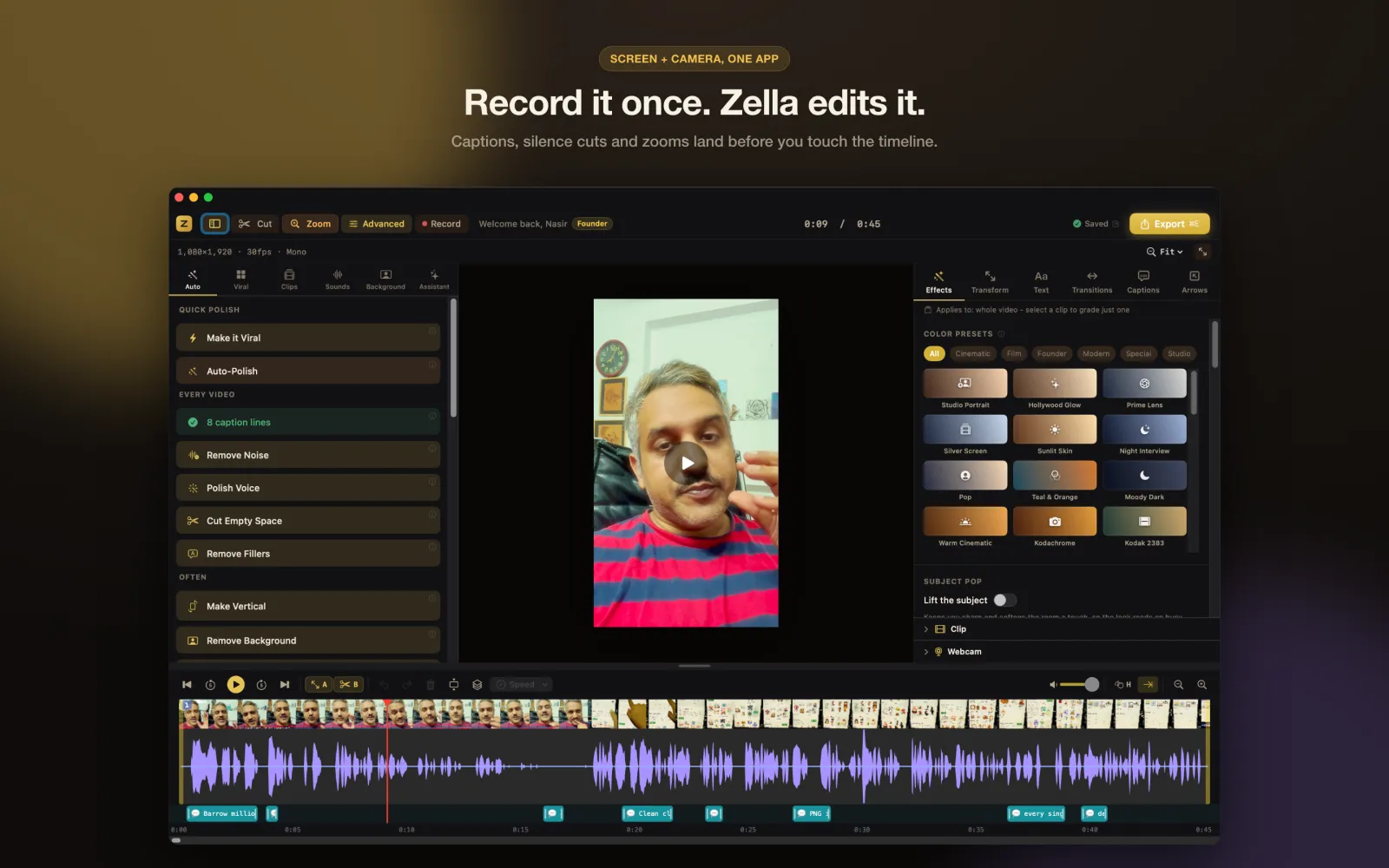
Record your screen or camera, tap once, and Zella cuts the silences, writes the captions, cleans your voice and scores it. The whole edit runs on the chip in your Mac or iPhone - which means you can do all of it in airplane mode.
Free forever - not a trial. No watermark, no account, no card.
BEFORE ANYTHING ELSE
The four questions, answered up front.
Is it really free?
Free forever, not a trial.
The complete editor and every AI feature, on every platform, with no watermark and unlimited recording. The only ceilings are on export: 2 minutes, and 1080p. 1080p is free forever.
Where does my video go?
Nowhere. It stays on your device.
Recording, captions, background removal, voice cleanup and export all run on your own hardware. There is no account to make and nothing is uploaded. The app works in airplane mode.
Is this a subscription?
No. $89 once, if you ever need it.
One payment unlocks Mac and iPhone together. There is no monthly bill, no seat count and no renewal. Most people never need it at all.
Can I actually use it?
If you can hit record, yes.
One tap does the whole edit. The timeline, keyframes and curve editor are there when you want them, and completely out of the way until then.
AUTO-POLISH
The edit you were dreading, done in one tap.
This is the part people pay an editor for, at $75 an hour and up. Zella runs all of it on your own device, on a raw take, before you have touched a single clip.
Silences and filler words
The "um", the "so yeah", the four seconds of you reaching for the mouse. Gone.
Extra cuts where you pause
And a cross-dissolve on the widest-spaced joins - about eight, however long the take.
Keyword captions with emoji
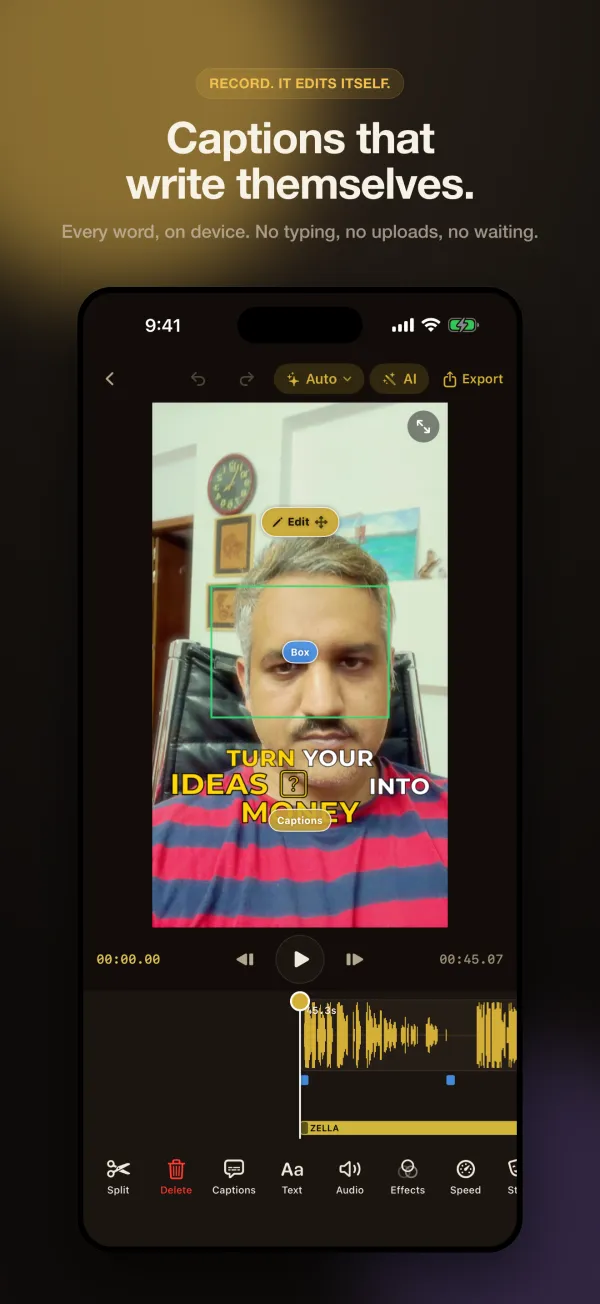
Written on-device from your own audio. The word being said is the word that pops.
Noise removal and voice polish
Room hiss out, level and tone in. It sounds like a microphone you did not buy.
A hook title and an opening punch-in
The first second earns the second second.
Emphasis zooms
The frame moves when you make a point, so a static talking head stops looking static.
Mood-matched music that ducks
A bed chosen to fit the video, dipping under every word you say.
Pattern interrupts
The small changes of pace that stop a thumb mid-scroll.
What it deliberately does not do: touch your colour. Your footage keeps the look you shot it with. Grading is a separate, optional tool with 93 looks in it on the Mac (92 on iPhone), free on every tier.
One tap on iPhone · the same passes, one click each, on the Mac · re-running never stacks doubles · every step undoable on its own
How Auto-Polish works →THE ACTUAL APP
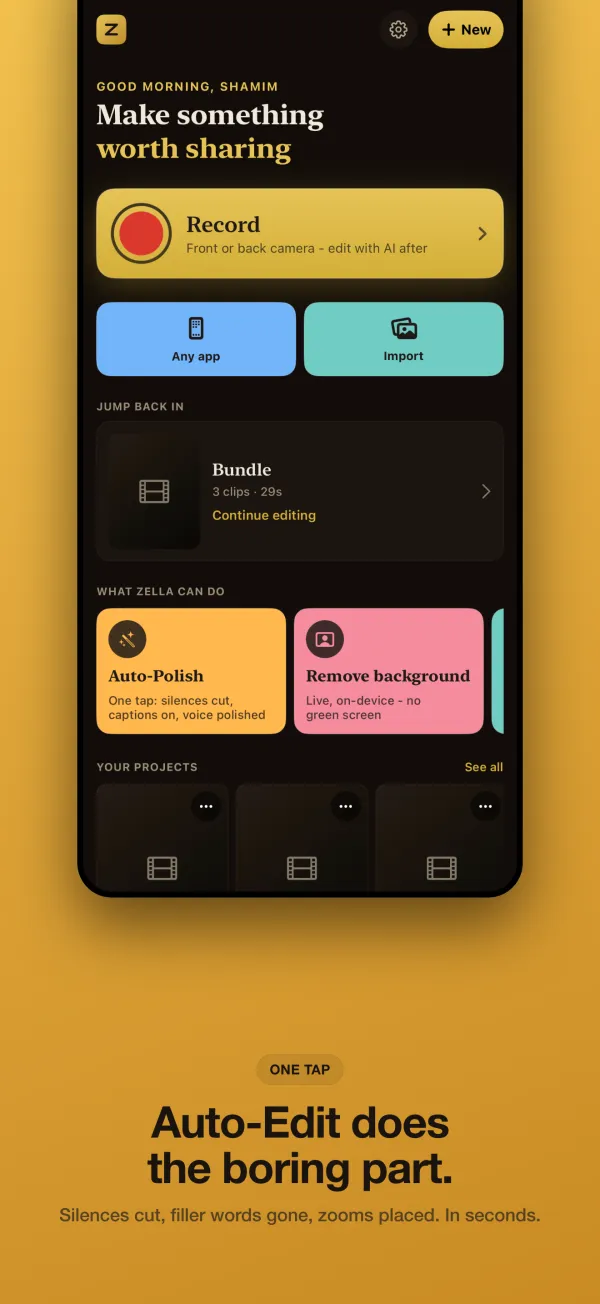
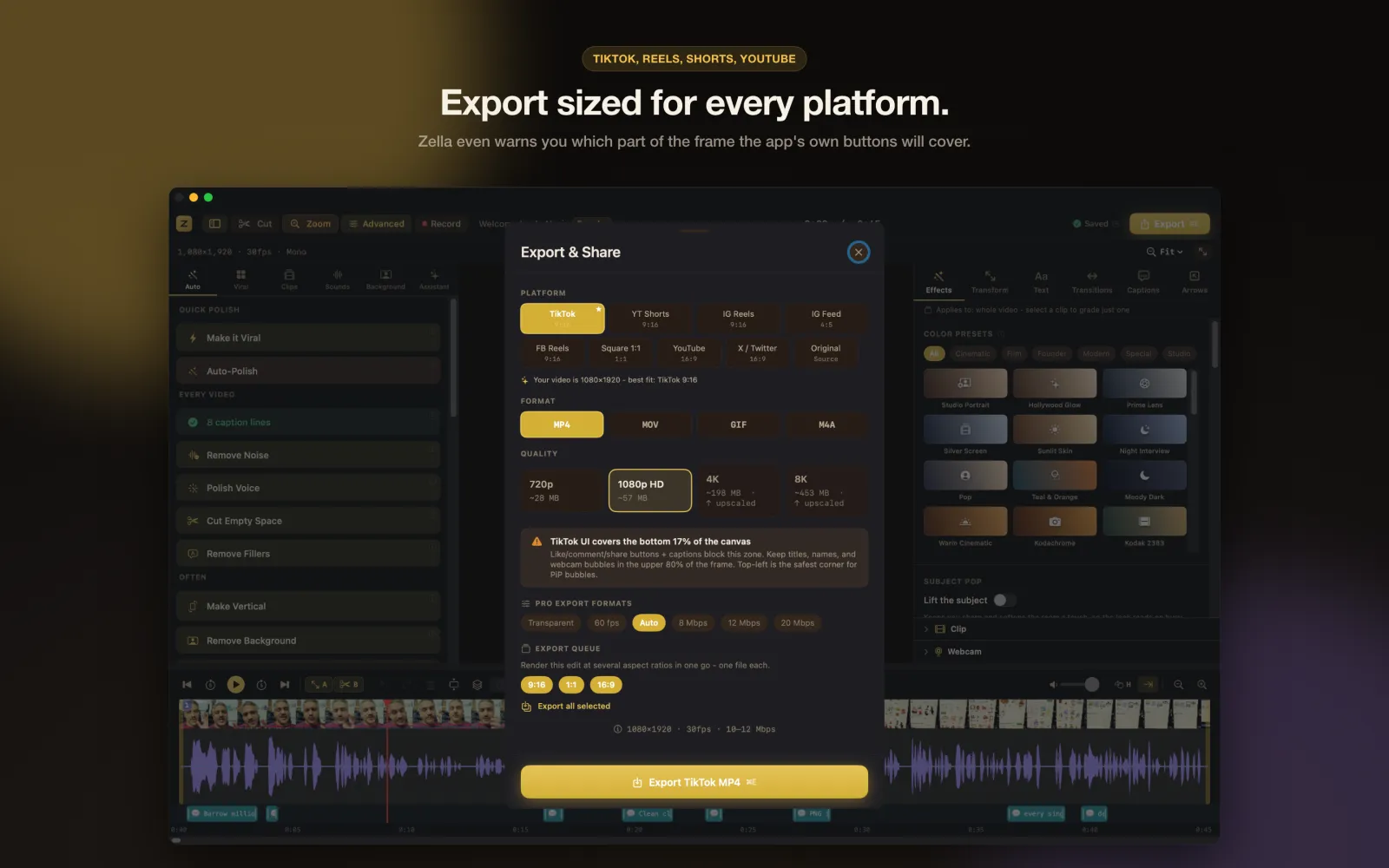
What you download is what you see here.
Real screens from Zella for Mac and Zella for iPhone as they ship on the App Store today. No mockups.
WHY IT IS FREE, AND WHY IT STAYS THAT WAY
There is no server. That is the whole trick.
It is arithmetic, not generosity - and a cloud-funded competitor cannot copy it without dismantling their own business.
Do not take it on trust. Put the device in airplane mode and export a whole video without reconnecting. An app that needed a server could not.
Two things touch the network only if you ask them to: the AI Assistant sends your typed prompt (never your video) using your own API key, and stock-footage B-Roll fetches clips. The captions model downloads once, around 145 MB, over Wi-Fi.
PRICING
Free is not the demo. Free is the product.
Most editors give you a crippled free tier to make you upgrade. Zella gives you the complete editor and all of the AI, and puts the price on two things you may never need.
Free is the complete editor and every AI feature, with no watermark and no account. Two ceilings, both on export: 2 minutes and 1080p. Lifting them is $89 once, for your Mac and iPhone together.
PRO WEEK
Every new install runs the complete Pro feature set free for 7 days. No card, no account, nothing to cancel. When the week ends nothing is taken from you - you simply keep the free tier, which is already the whole editor.
WHAT IS IN THE BOX
A real editor underneath the one tap.
You never have to open any of this. It is here for the day you want it.
One tap, ready to post
Auto-Polish runs the whole retention edit. Make it Viral goes further in a single tap.
Explore One-Click →No green screen needed
Cut yourself out of any room and drop in one of 40 backdrops, live while you record.
Explore Background →Captions that hold attention
Viral caption presets with active-word highlight, plus 20 ways to point at what matters (19 on iPhone).
Explore Captions & Callouts →Capture
Full screen, a window, a region or just the camera on Mac. Camera, screen or the whole device on iPhone.
AI Assistant
Type "cut the dead air and make it vertical" and it does it. 102 actions on Mac, 72 on iPhone. Free on every tier.
Pro Editor
A real timeline when you want one - ripple delete, drag to reorder, J and L cuts, 50 levels of undo.
Effects & Color
93 cinematic colour looks on the Mac and 92 on iPhone - 96 and 95 with the Founder grades - with LUT import and an intensity slider.
Sounds & Audio
101 sound effects on the Mac and iPhone, 16 voice changers, and music that ducks under your voice without being asked.
Ship Everywhere
Reframe to 9:16, 1:1 or 16:9 with face tracking, then export with the platform preset already set.
ZELLA FOR IPHONE · ON THE APP STORE
The whole studio. In your pocket.
Not a companion viewer - the same studio, rebuilt for touch. It records, cuts, captions, grades, removes backgrounds and exports entirely on the phone, with nothing uploaded.
- Auto-Polish in one tap, exactly as it runs on the Mac
- Background removal live in the viewfinder, while you film - no green screen
- Make Vertical - face-aware 9:16 for TikTok, Reels and Shorts
- Captions translated into 19 languages, on-device, with no network at all (iOS 18+)
- Auto B-Roll with no API key and no network, and the AI Assistant with 72 actions
- Hand a project to the Mac as a .zella file - one Zella Pro unlocks every Apple device
HOW IT COMPARES
The differences that cost you money.
Every row is a fact you can check on their own pricing page.
| Feature | Zella | Screen Studio | Descript | Loom | CapCut |
|---|---|---|---|---|---|
| Free plan with no watermark | Yes | No | No | No | No |
| Runs 100% locally (files never leave your device) | Yes | Yes | No | No | No |
| One-time price for Pro (no subscription) | Yes | Yes | No | No | No |
| One purchase unlocks Mac and iPhone (Universal Purchase) | Yes | No | No | No | No |
| Unlimited recording length on free (2-min export cap) | Yes | No | No | No | Yes |
| Native Mac app (not a web wrapper) | Yes | Yes | Yes | No | No |
| AI cleanup - remove silence + filler words | Yes | No | Yes | No | Yes |
| Auto B-Roll - stock clips placed from your captions | Yes | No | No | No | No |
| Auto-zoom on cursor clicks | Yes | Yes | No | No | No |
| On-device captions (no upload) | Yes | No | No | No | No |
| Color grade + LUT looks | Yes | No | No | No | Yes |
| One-click 9:16 / 1:1 / 16:9 reframe | Yes | Yes | Yes | No | Yes |
| No cloud account required | Yes | Yes | No | No | No |
WHO IT IS FOR
Find the job you are actually trying to do.
Each one is a walkthrough of the real workflow, including an honest note on where the free tier runs out - and where it never does.
Create and grow an audience
Sell your product
Get paid for video work
STILL DECIDING
The questions people actually ask.
I have never edited a video. Is this too advanced for me?
No, and that is the whole design. Record, tap Auto-Polish, export is a complete route to a finished video, and you can stop there permanently - the app does the cutting, captioning, sound and pacing for you. Everything a professional editor would reach for (keyframes, bezier curves, luma scopes, masks, speed ramps) sits behind an Advanced Tools switch and stays hidden until you turn it on. Nothing you do is destructive either: there are 50 levels of undo, and every Auto-Polish step can be removed on its own.
Do I have to buy Zella twice for Mac and iPhone?
No. Zella Pro is a Universal Purchase: one $89 payment unlocks Mac and iPhone together, tied to your Apple ID. Buy it on whichever device you happen to be using and the others unlock when you sign in. The same is true of Zella Founder. And every new install - on any of those devices - starts with Pro Week: seven days of the complete Pro feature set, with no card and nothing to cancel.
Is there a Zella app for iPhone?
Yes - Zella for iPhone is a full editor, not a companion viewer. It records with the camera or the screen, cuts, captions, grades, removes backgrounds, mixes audio and exports, entirely on the device. It is the same editor as the Mac app, rebuilt for touch, and on the phone that means a multi-clip timeline with an Audio tool, picture-in-picture overlays with free-form resize, 25 transitions, 92 colour looks, 9 caption presets, 19 callouts, on-device Auto-Polish and the AI Assistant. Everything runs on-device - nothing is uploaded, and it works in airplane mode. See /ios for the full feature list, or the iPhone chapters of the docs.
Do the AI features need internet?
No - on any device. Auto-captions, filler-word removal, silence removal, and background removal all run on-device. On iPhone the captions model downloads once (about 145 MB) the first time you transcribe, and works offline after that. The optional AI Assistant (free - bring your own key) is the one feature that calls out to a language model, and only optional stock-footage B-Roll fetches clips.
What do I need to run it?
On the Mac: macOS 14 Sonoma or later, on Apple Silicon or Intel - Zella ships as a universal binary. On mobile: any iPhone running iOS 18 or later. No account and no internet connection are needed to run either one.
Can I get a refund?
Yes. Because purchases go through the App Store, refunds follow Apple’s standard policy - request one at reportaproblem.apple.com. We’re also happy to help if something went wrong; see the contact page.
Your next video is one tap from finished.
It costs nothing to find out whether the one tap is any good: no card, no account, no watermark on what comes out. If it is not, you have lost a download.
macOS 14 Sonoma+ · iPhone on iOS 18+ · Local-only · No cloud