Automatic silence removal cuts the gaps between sentences and typically shrinks a talking-head take by 20-40% while making it feel faster. The catch is word safety: a naive gate clips the tails of syllables, so every cut needs padding. Zella pads its cuts so words breathe, removes filler words in the same pass, and runs both inside Auto-Polish.
Record yourself talking for one minute, then watch it back. The pauses you never noticed while speaking - the breath before a sentence, the second spent hunting for a word - suddenly feel enormous.
That is not your imagination. Speaking and listening run on different clocks: while you talk, a pause is thinking time; while you watch, it is nothing happening. And in a feed, "nothing happening" has a swipe gesture attached to it.
This page is about the judgement: which pauses earn their place and which ones only feel like they do. For the mechanics of actually cutting them, see how to remove silence from a video on Mac, or tap Remove silences in Zella for iPhone, where the same pass runs on the phone.
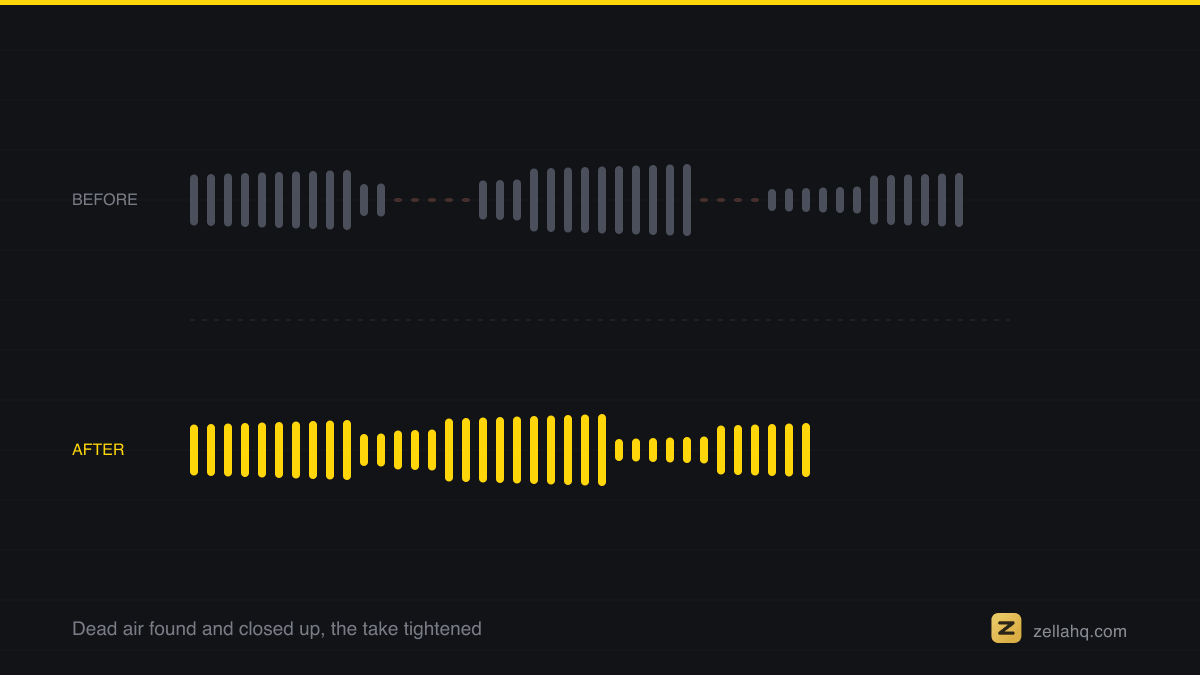
What silence removal actually changes
Cutting the dead air between sentences typically shrinks a raw talking-head take by 20-40% - a 90-second ramble becomes a 60-second video with the same content. But the length is the smaller win. The bigger one is density: every second now contains speech, so the video feels confident and prepared, even though you recorded the same hesitant take. Sentence follows sentence the way it does in your head, not the way it does in real time.
There is a compounding effect too: each removed gap becomes a cut, and those cuts land exactly at sentence boundaries - which is where cuts feel most natural. Silence removal is secretly also a cut-cadence tool.
This sits on Apple's AVFoundation, the framework that composes the timeline and writes the export back out again.
The word-safety problem with automatic cuts
The naive approach - delete everything below a volume threshold - routinely amputates speech. Trailing consonants are quiet ("…workfl - "), and soft sentence starts get clipped. One chopped syllable does more damage than five seconds of dead air, because it sounds broken rather than merely slow.
The fix is padding: keep a small buffer of audio on each side of every cut so words finish and begin naturally. Zella's silence removal is word-safe by design - it detects gaps from the audio, then pads each cut so the last syllable breathes. On the Mac you can review the detected gaps before applying; on iPhone the Clean Up pass does it in one tap.
Fillers are the same problem, smaller
"Um," "uh," "like," "you know" are micro-silences: sounds carrying no content that dilute density the same way gaps do. Because they sit inside sentences, they need a transcript to find - Zella transcribes on-device and ripple-deletes them in the same pass as the silences. A take you'd rate as "too rambly to post" often becomes postable with just these two passes.
When to keep a pause
Not every gap is dead air. Keep the pause when it is doing work:
- Before the punchline or key claim - a beat of silence is emphasis.
- After a big statement - landing time.
- Comedic timing - the pause is the joke.
A good workflow is: remove silences automatically, then re-insert intention where you want it - a one-second hold before your key line reads as deliberate precisely because the rest of the video is tight.
Where silence removal fits in a full edit
Silence and filler removal should be the first edit, because everything else - captions, transitions, music ducking - should be built against the tightened timeline. That is exactly how Zella's Auto-Polish orders its pipeline: silences, then fillers, then all the timeline surgery, then voice and music against the final cut, so captions you add afterwards land on the final timing. One tap, and the rambling take you actually recorded plays like the tight take you intended.
Frequently asked questions
Does removing silence actually improve retention? Yes. Dead air gives viewers a reason to swipe, and short-form retention is unforgiving in the first seconds. Tightening the gaps keeps every second full of content, and creators routinely see watch-time climb 25-40% because the video simply feels faster and more prepared.
How much shorter will my video get? Cutting the pauses between sentences typically shrinks a raw talking-head take by 20-40% - a 90-second ramble becomes about a 60-second video with identical content.
What settings should I use for silence detection? A common starting point is a threshold around −40 dB with a minimum silence length of about 0.5 seconds, so gaps longer than a blink get cut while natural speech rhythm survives. Raise the minimum length if your delivery is deliberately paced.
How do I remove silence without cutting off words? Use padding: keep a small buffer of audio on each side of every cut so trailing consonants finish and soft starts aren't clipped. Naive volume-gate tools amputate quiet syllable tails - one chopped word does more damage than five seconds of dead air. Zella's silence removal is word-safe by design.
Should I ever keep a pause? Yes - keep the pause when it does work: before a punchline or key claim (emphasis), after a big statement (landing time), or when the pause is the joke. A good workflow removes silences automatically, then re-inserts a deliberate hold where you want it.
Make your next video with Zella.
Record, edit and ship on Mac and iPhone - local, private, free to start.
PART OF A SERIES
Cutting dead air and filler words
The silence scan, the filler-word pass, and when to leave a pause alone.
- How to Remove Silence From a Video on Mac (Dead Air, Gone)
- How to Remove Filler Words From a Video on Mac
- How to Remove Filler Words and Silences From iPhone Video
- When to Cut a Pause and When to Leave It Inyou are here
All of it lives under One-Click.
RELATED