Sound on iPhone: Effects, Voice Changers, Music & Beat Sync
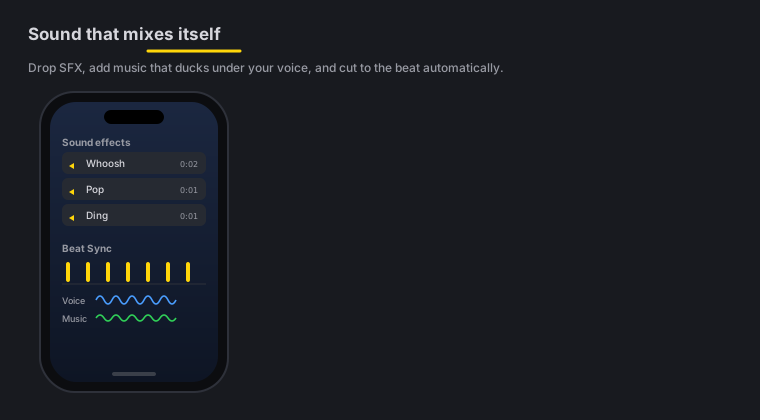
Quick answer: The phone ships with 101 built-in sound effects, 16 royalty-free background-music tracks that dip under your voice and swell back, 16 voice changers, voiceover recording with the video playing in front of you, Polish Voice with five studio tones, and per-band Beat Sync that pulses zooms and effects to the kick, snare or hats. All of it runs on-device - nothing to download, nothing uploaded, and no attribution line in your description.
On this page: where the sound lives · sound effects · voice changers · 16 music tracks · voiceover · voice tones · Beat Sync · FAQ
The Audio tool
Everything you can hear lives behind one button: Audio, in the timeline toolbar.
Open it and you get the selected clip’s volume (0-200%, with a mute), a row for every video overlay on the timeline with its own level and mute, and the full sound library below - effects, voice changers, music that dips under your voice and the voice tones. Sounds used to sit inside Studio next to titles and captions, which buried them; they are now where you’d look for them.
101 sound effects
Drop from 101 built-in sound effects - whooshes, pops, risers, impacts, UI clicks, a page turn, a cash register, applause and more - straight onto your timeline. They’re sorted into the same eight categories as the Mac (Transitions, Pops & UI, Impacts & Risers, Reveal & Suspense, Meme & Comedy, Gaming, Social & Alerts and Foley & Ambience), and a Search sounds box at the top finds one by name or by the word you’d use (“meme”, “game”, “hit”). There are no files to download or licenses to chase; they’re baked into the app. Place a whoosh on a cut, a pop on an arrow or label, a riser before a reveal - then drag the sound on the timeline to snap it under any cut or transition. It is the same 101-effect catalog as the Mac’s sound effects tab.
Auto sound at cuts
Don’t want to place them by hand? Auto sound at cuts puts one matched whoosh, impact or riser under every transition in one tap - the effect is picked to fit the transition type, impacts land on the cut, whooshes straddle it, risers build in. Tap again to remove the auto-placed set; sounds you placed yourself stay. Auto-Polish runs this same pass automatically.
16 voice changers
Sweeten or transform your narration with 16 voice changers - chipmunk, robot, echo, reverb, megaphone and more. Apply one to a clip’s audio for effect, or to hide your voice. These match the Mac’s voice changers.
16 background-music tracks, composed for Zella
The music library holds 16 tracks, in the genres short-form actually runs on:
| Bed | What it’s for |
|---|---|
| Lo-fi Beat, Chill Keys, Ambient Air | Talking head, tutorial, anything where the voice leads |
| Uplift, Epic Rise, Cinematic Pulse | Product demos, launches, before-and-after reveals |
| Trap Beat, Drill Night, Phonk Drift | Fast cuts, gym and car content, edits that need aggression |
| Amapiano Sun, Desi Pop, Bossa Café | Lifestyle, food, travel, anything warm |
| Synthwave, Funk Groove, Acoustic Warm | Retro, vlog and B-roll montage |
| Sad Piano | Storytime, the turn in a narrative, a serious close |
They are generated on the device, which has two consequences worth knowing. They are genuinely royalty-free - composed for Zella, so there is no attribution line to put in your description, no track licence to renew, and no Content ID claim waiting on a video that does well. And they work with no network: the track renders on the phone the first time you use it and is cached, so a plane, a train or a bad signal changes nothing.
Hear it before you place it
Tap any track or sound effect to audition it; tap + to place it. Nothing lands on your timeline until you say so.
Music dips when you talk
Turn on “Music gets quieter when you talk”: the music dips automatically under your voice whenever you’re speaking, then swells back in the gaps. You get a scored video without manually riding the volume - the same ducking as the Mac’s Auto-Duck. Sentences that come close together stay ducked instead of letting the music bounce up in the tiny gaps, and the ducking only ever touches the music bed, never your sound effects. Beds and effects land on time even deep into a long export. Combine it with per-clip volume for a clean, balanced mix.
Background music is a timeline citizen too: drag either end of the music strip to trim how long it plays, drag its middle to move it, and set its volume per track. When Auto-Polish adds music, it also mood-matches the pick to your speaking pace, snaps its start to the take’s first beat, and shapes an arc - a stronger intro before speech, swells in long pauses, and a fade-out at the end.
Record a voiceover over your own video
Audio → Record voiceover records narration straight onto the timeline, starting at the playhead.
The video plays while you talk. That is the entire job of a voiceover tool, and it is the part most mobile editors leave out - you narrate to picture, watching the cut you are describing rather than reciting to a timer. Where the audio goes depends on what is plugged in, and Zella says which: with headphones you hear the video while you record; on the speaker the video is muted, because otherwise your microphone records the video’s own audio back into the take.
Three things protect the recording:
- A stray tap outside the sheet cannot dismiss it mid-take.
- If a call, Siri, an alarm or the screen locking interrupts the audio session, Zella keeps everything you had already said, drops it on the timeline at the right place, and tells you where it stopped - instead of silently handing you a truncated take.
- The raw recording is never overwritten.
Voice effects on your voiceover
A finished voiceover is not frozen. Tap the voiceover strip and apply any of the 16 voice changers to it - the same DSP the clip-level changer uses. Because the effect always renders from the untouched original, effects replace each other rather than stacking, and choosing None gives you back exactly the take you recorded.
Per-band Beat Sync
Beat Sync pulses your zooms and effects to the music - and it’s per band, so you can drive them from the kick, the snare or the hats independently, each with its own sensitivity. Sync the zooms to the beat and your edit feels choreographed. It’s the mobile version of the Mac’s Beat Sync.
Five voice tones
Polish Voice cleans your narration to broadcast loudness - and the tone picks its character. It starts by lifting your voice out of the room with Apple’s Voice Isolation engine, the same one Final Cut Pro uses for its Voice Isolation slider, so the cleanup happens before any of the shaping does. The polish foundation on top (rumble control, mud dip, broadcast compression, loudness normalize) is shared; the voicing is yours:
- Natural - light touch, true to source
- Warm - big low end, soft top
- Bright - lean lows, crisp airy highs
- Podcast - the ear-approved studio voicing (the default)
- Cinematic - biggest, deepest, densest
Pick a tone in Cleanup → Voice tone, then run Polish Voice - or switch the tone any time and the polish re-renders immediately with the new voicing. If a voice changer is active it re-renders too, from the fresh polish.
Remove Noise on its own runs the same Voice Isolation engine without the studio voicing, for takes that need the room gone but not the broadcast treatment. Both can be applied to one selected clip rather than the whole video, so a single noisy clip can be cleaned without touching the rest.
iOS sound FAQ
Do I need to download sound effects? No - 101 effects are built in, no files to hunt down.
Can I disguise or transform my voice? Yes - 16 voice changers (robot, echo, megaphone and more) apply to a clip’s audio.
Does the music dip under my narration automatically? Yes. Turn on “Music gets quieter when you talk” and the track dips under your voice, then swells back in the gaps.
Is the built-in music actually free to use commercially? Yes. All 16 tracks are composed for Zella and generated on your device, so there is no attribution line to add, no licence to renew and nothing for a Content ID system to claim. Use them on monetised videos and client work.
Can I hear a track before it lands on my timeline? Yes - tap to audition, + to place. That applies to the sound effects too.
Can I watch the video while I record a voiceover? Yes, and it is the default: the video plays while you talk. On the speaker it plays muted so your microphone cannot record it back; with headphones in, you hear it.
Can I put an effect on a voiceover after I record it? Yes - any of the 16 voice changers. Effects always render from the original take, so they replace rather than stack, and None restores exactly what you recorded.
What happens if a call comes in mid-voiceover? Zella keeps what you had already said, places it on the timeline and tells you where it stopped. You do not lose the take.
Can I sync edits to the beat? Yes - per-band Beat Sync pulses zooms and effects to the kick, snare or hats, each with its own sensitivity.
Does the sound processing run on-device? Yes - like everything else on the phone, it’s on-device with nothing uploaded.
Pro tips & gotchas
- Turn on “Music gets quieter when you talk” before you fuss with music volume - it rides the level under your voice for you.
- A whoosh on every cut and a pop on each arrow or label makes an edit feel intentional; don’t overdo it.
- Pick one drum for Beat Sync. Driving zooms off just the kick often reads cleaner than syncing to everything at once.
- Balance first with per-clip volume, then layer music and effects on top.
Related: The iOS editor → · Captions & titles → · Export & handoff → · Mac sound effects → · Music & Auto-Duck → · Beat Sync →